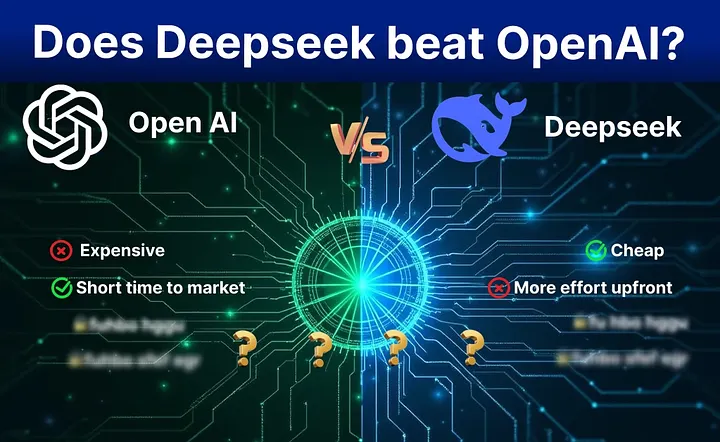
Rebuilding AI-Powered Document Processing: Lessons from Our OpenAI to DeepSeek Migration
March 2, 2025
The Smarter Way: Leveraging Technology and Expertise
The Smarter Way: Leveraging Technology and Expertise
“Our AI-powered document reader was running smoothly with OpenAI — until we started noticing inconsistencies in how it extracted key details from supply chain documents. Some days, it worked like magic. Other days, we’d have to clean up messy responses. And then came the API costs…”
This is the story of how we migrated from OpenAI to DeepSeek for processing and verifying supply chain documents.
Supply chains have a multitude of different document types — invoices, purchase orders, bill of lading, certifications, product catalogues, lab reports, you name it. These documents carry a large amount of vital information pertaining to suppliers, compliance, batch tracking and authenticity. Our experience spanning well over 8 years, implementing supply chain traceability, both in the developed world and in emerging markets shows that manually extracting insights from these documents is a nightmare. This observation led us to experiment a GenAI based approach for extracting information automatically from all types of files. Basically you upload all the files at your disposal and a system using a combination of OCR, GenAI and few other AI techniques extracts important information into a well-defined structured format, which can then serve as the basis for a myriad of use cases such as internal tracking, consumer transparency and automated compliance.
Utilizing OpenAI’s GPT-4o, the system worked well, when tested for a number of supply chains, each containing hundreds of files, however, not without pains.
- API costs creeping up : Average number of tokens in all files for a supply chain neared 50 million, and some documents had to be processed by GPT multiple times for extracting different kinds of information each time. This ended up generating heavy costs both during the development and in production. Switching to o3-mini in some cases reduced the cost significantly, but not enough to eliminate concerns about the system’s overall cost-effectiveness.
- Availability : OpenAI APIs at times went inaccessible for extended periods, disrupting the production operations as well as developer productivity. This lead us to lean towards a fallback mechanism to ensure high GenAI availability.
- Accuracy Issues : Although we were able to obtain 90%+ true positives and 5%- false positives, we wanted to check if other GenAI models would be able to iron out issues in the OpenAI output.
At this point, we started exploring alternatives and DeepSeek came up as a promising candidate, especially offering nearly 25 times cheaper pricing compared to GPT-4o. In text book examples presented in the internet it performed shoulder-to-shoulder against OpenAI, but we wanted to verify that these claims hold valid for a complex, real world case like ours.
Purpose of this report
This isn’t just a side-by-side comparison of OpenAI vs. DeepSeek — you can get that anywhere. This is our real-world experience of actually making the switch.
Here’s what you’ll find in this report :
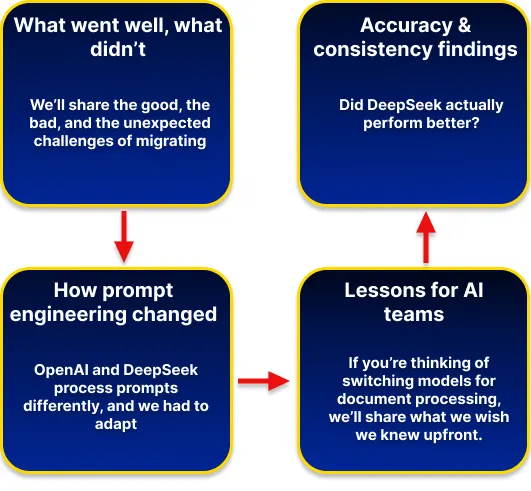
So, did DeepSeek outperform OpenAI? Was the migration worth it? Let’s dive in.
OpenAI vs. DeepSeek: Key Differences & Considerations
The first observation was that DeepSeek offered an API that closely resembled that of OpenAI, indicating a smooth switch. However, switching AI models isn’t just about swapping APIs. It’s about understanding how they think, how they process information, and how much effort you’ll need to make them work for your specific use case.
When we started experimenting with DeepSeek as a replacement (or a hybrid) for OpenAI, we quickly realized that while both models fall under the “large language model” umbrella, they behave very differently — especially when it comes to the type of documents we used.
Model Behavior & Prompting
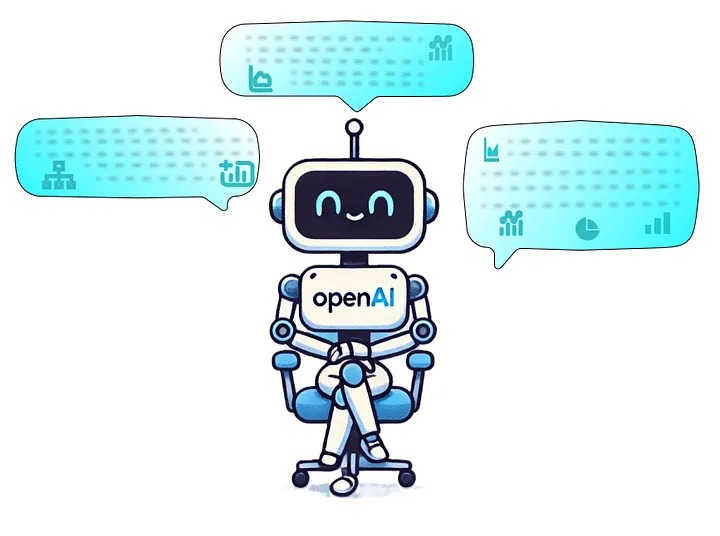
“OpenAI felt like a senior analyst who could understand what you meant even if you weren’t super specific. DeepSeek, on the other hand, felt more like an intern — super capable, but only if you gave them a detailed step-by-step guide.”
→ OpenAI: Intuitive & Flexible
OpenAI could figure things out with minimal instructions — a short, well-worded prompt was often enough.If a document was messy or had some missing fields, it still made reasonable guesses. This meant we spent less time crafting the perfect prompt and more time focusing on what to do with the extracted data.
→ DeepSeek: Needs Explicit Instructions
DeepSeek needs a lot more hand-holding — it’s not great with vague or high-level prompts. To get structured outputs, we had to spell out everything in detail (e.g., specifying exact JSON structures, strict formatting rules). If something wasn’t explicitly mentioned in the prompt, DeepSeek often ignored it.
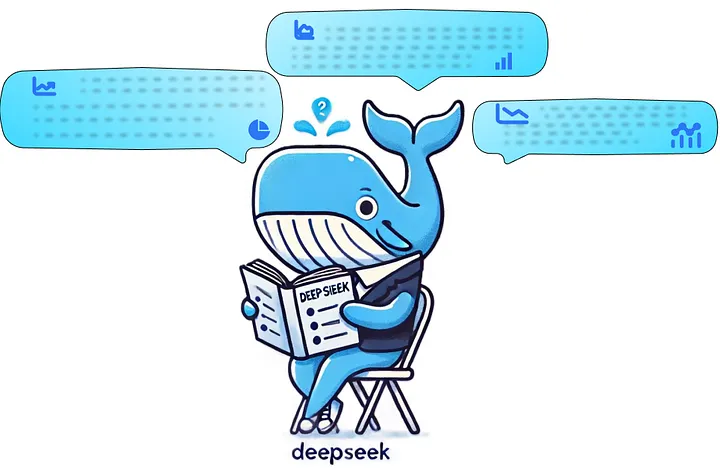
Takeaway: If you’re coming from OpenAI, expect to invest more time in prompt engineering for DeepSeek. But once you get the prompts right, DeepSeek can be more predictable in its structured responses.
Output Consistency & Formatting
“OpenAI was like a creative writer — you’d get decent results most of the time, but sometimes it went off-script. DeepSeek, once optimized with the right prompt, stuck to the script like an engineer writing documentation.”
→ OpenAI: Mostly Consistent, but Sometimes Improvises
OpenAI generally understood the structure we wanted, but it occasionally included unwanted text (e.g., extra explanations or markdown formatting). If a document was unclear, OpenAI sometimes tried to “guess” what the missing information might be, which wasn’t always ideal for compliance-related tasks.
→ DeepSeek: Stricter, but Requires More Prompting
Once DeepSeek was given a well-structured prompt, it followed it exactly. This is great for strict formatting needs (e.g., JSON outputs for automated processing), but it required a lot of upfront effort to fine-tune. On the downside, if DeepSeek couldn’t find something, it was more likely to return nothing rather than attempting an educated guess.

Accuracy & Data Extraction Performance
“One of our key requirements was being able to correctly extract structured data from certificates, invoices, and other supply chain docs. This is where things got interesting.”
→ Where OpenAI Performed Better
Recognizing Claims & Context : OpenAI was better at interpreting claims (e.g. organic, vegan, fair-trade) in documents. If a certification document referenced an ESG claim, OpenAI often understood the intent and pulled out the right details. DeepSeek, in contrast, missed claim interpretation entirely in some cases.
Handling Missing Data Gracefully : If a certificate was missing a field (like an expiration date), OpenAI was more likely to acknowledge it or infer context. DeepSeek often ignored fields unless explicitly present.
→ Where DeepSeek Performed Better
Strict Field Extraction : If OpenAI sometimes guessed or included extra text, DeepSeek stuck to extracting exactly what was defined in the prompt — no more, no less.
Certification Coverage Extraction : DeepSeek was better at recognizing certification coverage details, whereas OpenAI sometimes missed nuances.
→ Where Both Struggled
Extracting product info from certificates : Neither model was 100% perfect when extracting product information from supplier certificates — sometimes missing or miscategorizing entries. This required additional logic and validation checks in post-processing.

Ease of Integration
“At first, we thought this migration would just be a matter of swapping API keys. Turns out, it was more like retraining a whole new AI assistant.”
→ OpenAI: Plug-and-Play
OpenAI worked well with minimal integration effort. The API structure was easy to work with, and we didn’t need to overcomplicate our data pre-processing.
→ DeepSeek: More Work Upfront
Required modifying how we structured prompts to get the same level of extraction accuracy. We had to tweak our error handling logic since DeepSeek was more rigid (e.g., when it didn’t recognize a document type). API responses had to be reformatted to fit our system since DeepSeek returned data in a slightly different structure.

Final Thoughts on OpenAI vs. DeepSeek
After running both models side by side, our key takeaways were:
- Prompting matters more in DeepSeek - If you like quick, flexible prompts, OpenAI is better. If you need rigid structure, DeepSeek works (but needs extra effort).
- OpenAI is better at contextual understanding - If your use case involves claim extraction, missing data handling, or reasoning, OpenAI has the edge.
- DeepSeek is better at strict field extraction - If you want guaranteed structured responses, DeepSeek follows instructions more precisely.
- Integration effort is higher with DeepSeek - Be prepared to rework your prompt strategies and possibly update your system’s handling of API responses.
So, was DeepSeek an easy drop-in replacement for OpenAI? No.
Was the migration worth it? That depends on what you value most — (flexibility + shorter time-to-market) or (precision + less operational cost)
In the next section, we’ll dive into how we actually carried out the migration — what worked, what didn’t, and what we wish we knew before starting.
The Migration Process
So, after realizing that OpenAI and DeepSeek had fundamentally different behaviors, we had a big decision to make: Do we tweak our existing OpenAI setup or go all-in on DeepSeek?
We chose to move forward with DeepSeek, but the transition wasn’t just about switching API endpoints. It involved reworking our prompts, handling new quirks in output formatting, and optimizing accuracy — all while ensuring our system still functioned reliably.
Here’s how we went about the migration:
Preparing for Migration
Before jumping in, we needed to make sure we weren’t making a blind switch. Our goal was to compare performance before fully committing, so we set up a structured migration plan.
[Step 1: Benchmarking OpenAI’s Performance]
To know if DeepSeek was really better, we first measured OpenAI’s baseline accuracy. We selected a diverse set of documents — certificates, invoices, purchase orders, and compliance reports. We logged extraction accuracy, including: Correct field identification, Handling of missing fields, Structured output consistency, Interpretation of complex elements (like claims and signatories). This gave us a ground truth to compare against when testing DeepSeek.
[Step 2: Defining Key Capabilities to Preserve]
While OpenAI had some inconsistencies, there were areas where it worked really well. We wanted to make sure we didn’t lose functionality when switching to DeepSeek.
- Maintain flexibility in document recognition - OpenAI could often identify document types with minimal instruction.
- Keep strong claim extraction - OpenAI was better at interpreting text-based claims in documents, something DeepSeek struggled with.
- Ensure batch traceability remains intact - Our system needed to connect document data to supply chain batch tracking, regardless of which model we used.
Adapting Prompts for DeepSeek
This is where things got tricky.
DeepSeek doesn’t handle short, flexible prompts well. If you’re used to OpenAI’s ability to “just figure it out”, you’ll quickly realize that DeepSeek needs explicit, structured instructions.
[Example: Validity Check Prompt for Certifications]
With OpenAI, we could get a simple “valid” or “invalid” response with a short prompt, DeepSeek, however, needed a lot more elaboration.
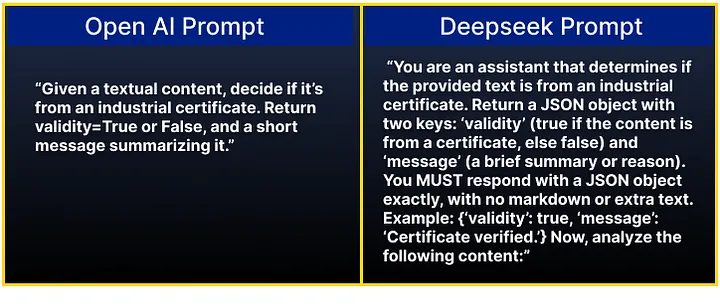
Key differences :
- DeepSeek required strict JSON formatting instructions.
- The prompt had to spell out exactly what to return — it wouldn’t infer missing details like OpenAI.
[Example: Certificate Data Extraction]
With OpenAI, a general instruction worked fine. DeepSeek? No chance. It needed field-by-field guidance.
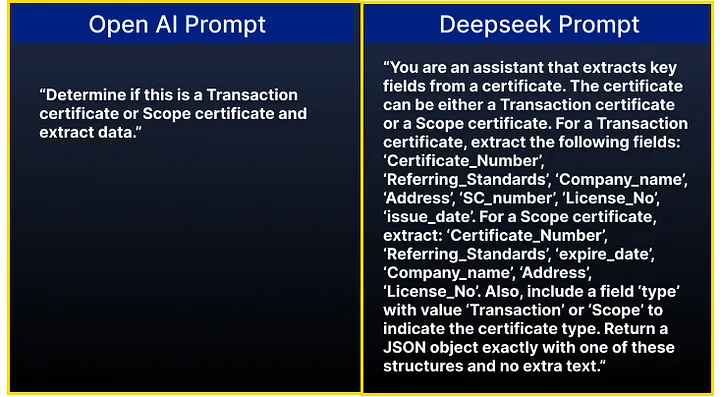
Key differences :
- DeepSeek required explicit field listings — otherwise, it ignored some fields.
- Had to include formatting rules to prevent unwanted responses.

Handling Accuracy Issues
During testing, we found some unexpected accuracy gaps in DeepSeek’s responses:
Issue 1 : Missing Supplier Product Data
DeepSeek failed to extract supplier product details in some cases. It would correctly extract data from one document but completely miss it in another.
📌 Fix: We had to force stricter input validation — modifying prompts to explicitly tell DeepSeek to pull every instance of a supplier product.
Issue 2 : Mislabeling Signatories & Auditors
DeepSeek incorrectly mapped auditors as signatories, a critical mistake in compliance documents. OpenAI had similar issues but was better at distinguishing the roles based on context.
📌 Fix: We trained DeepSeek to recognize role-based context using separate classifier prompts.
Issue 3 : Failed Clain Interpretation
OpenAI could interpret claims in certifications (e.g., “This certificate confirms compliance with ESG standards”). DeepSeek completely failed at claim extraction — it didn’t recognize them unless explicitly told.
📌 Fix: We introduced an additional post-processing step to identify and validate claims.
Issue 4 : No Output vs Wrong Output
OpenAI guessed when uncertain (sometimes wrong but still informative). DeepSeek returned nothing if data wasn’t explicitly stated.
📌 Fix: We modified error handling to flag missing DeepSeek outputs for manual review instead of assuming correctness.
Final Integration Adjustments
After refining DeepSeek’s prompts, we updated our integration logic:
→ Stronger pre-processing : Ensuring input text was formatted correctly before feeding it into DeepSeek.
→ Post-processing checks : Validating missing fields, ensuring consistency, and correcting labelling errors.
→ Benchmark comparisons : Running OpenAI vs. DeepSeek side by side to verify improvements. After several iterations, we got DeepSeek to produce structured, predictable responses, but it required much more setup work than OpenAI ever did.
Final Thoughts on Migration
If you’re migrating from OpenAI to DeepSeek, expect a few bumps along the way:
- DeepSeek isn’t a plug-and-play replacement — it requires more structured prompts and stricter formatting rules.
- You’ll spend more time fine-tuning prompts, but once optimized, DeepSeek follows instructions more rigidly than OpenAI.
- Accuracy gaps exist, especially for contextual interpretation (claims, role identification), but they can be addressed with pre-processing and post-processing tweaks.
So, was it worth it? That depends on your priorities.
If you need a quick, flexible, context-aware model, OpenAI might still be the better choice. If you need structured, highly controlled outputs (and are willing to put in extra effort), DeepSeek is a strong alternative.
In the next section, we’ll break down our post-migration observations, including whether DeepSeek held up in production and what we’d recommend to other teams considering a similar switch.
Unexpected Challenges & What We Wish We Knew Earlier
“If we could go back and do this migration all over again, here’s what we would have done differently.”
- Promt Engineering is Non-Negotiable
We initially assumed DeepSeek would work well with minor prompt tweaks. Wrong. Every prompt needed to be rewritten from scratch, with extreme attention to formatting.
Lesson learned: If you’re migrating to DeepSeek, plan for extra development time just for prompt tuning.
- DeepSeek Fails Silently - You Need Backup PlansUnlike OpenAI, which tries to return something even when uncertain, DeepSeek just leaves fields blank if it can’t find them. This caused problems when processing certifications where missing data is a compliance risk.How we fixed it:
- Unlike OpenAI, which tries to return something even when uncertain, DeepSeek just leaves fields blank if it can’t find them. This caused problems when processing certifications where missing data is a compliance risk.
- We implemented redundancy checks — if DeepSeek didn’t extract a field, we cross-checked against metadata.
- Some Accuracy Issues Needed External FixesCertain weaknesses — like failing to recognize supplier products or mislabeling signatories — didn’t improve even with better prompts.How we fixed it:
- We introduced AI-assisted post-processing using rule-based logic and entity matching.
- We manually reviewed high-risk documents instead of trusting DeepSeek’s output completely.
- Performance is More Stable, But Less Adaptive
DeepSeek is less prone to “hallucinations” (inventing information), but it’s also less adaptive to new document formats. OpenAI handled variation in certificate layouts better, while DeepSeek struggled with non-standard formatting.
Lesson learned: If your documents have high variability, DeepSeek might need pre-processing to standardize inputs.
Would We Recommend DeepSeek?
So, after all this, would we recommend DeepSeek to other teams migrating from OpenAI?
[Yes, if you need structured, cost-efficient AI processing]
If your main goal is to extract structured data in a predictable format, DeepSeek works well once optimized. If you need to process documents at scale while controlling costs, DeepSeek’s pricing is a major advantage.
[No, if you need high-context understanding]
If your use case involves interpreting claims, reasoning through complex text, or making sense of missing data, OpenAI is still the better choice. If your documents change formats frequently, OpenAI will adapt much faster than DeepSeek.
What We’d Do Differently Next Time
→ Test models on all document types earlier : Some DeepSeek issues (like failing to interpret claims) weren’t obvious in early tests.
→ Plan for prompt engineering upfront : If switching models, expect major prompt rework instead of minor tweaks.
Keep OpenAI in parallel for contextual cases — A hybrid approach might bring the best of both worlds — using DeepSeek for structured extraction and OpenAI for context-heavy interpretation.
Final Thoughts
Migrating from OpenAI to DeepSeek was a valuable learning experience. While DeepSeek required more effort to configure, it proved reliable for structured document extraction — but it wasn’t a one-size-fits-all solution.
[Would we do it again? Yes, but only with a solid strategy in place.]
If your team is considering switching models, here’s our best advice: know your priorities — whether it’s flexibility, cost, or strict output control — and be prepared for a lot of fine-tuning.